  • Conferences
  • Speakers
  • Skillcamp
Notifications
  • Strategies for Online and Offline Success
    ×
  • That Will Get You Speaking Engagements in 2024
    ×
  • For a Meeting or Talk
    ×
  • SpeakerHub's commitment to innovation and user-centric design.
    ×
  • How to Make Your Public Speech Professional and Memorable
    ×
  • SIGN UP
  • SIGN IN
  1. Home
  2. Find a speaker
  3. Arthur Graus
Arthur Graus's cover banner
Silver
Arthur Graus's picture

Arthur Graus

Power BI Trainer / Consultant
Self Employed
Country or state 
Netherlands
Available to 
Global
City 
Eindhoven
Fee 
Ask for pricing
Languages 
Dutch,
English
Volunteer
Yes

Personal Details

Bio

Arthur Graus has been working as a consultant and trainer since 1999 in the area of BI and SQL Server. His strength? Years of experience combined with a great enthusiasm to share his knowledge.

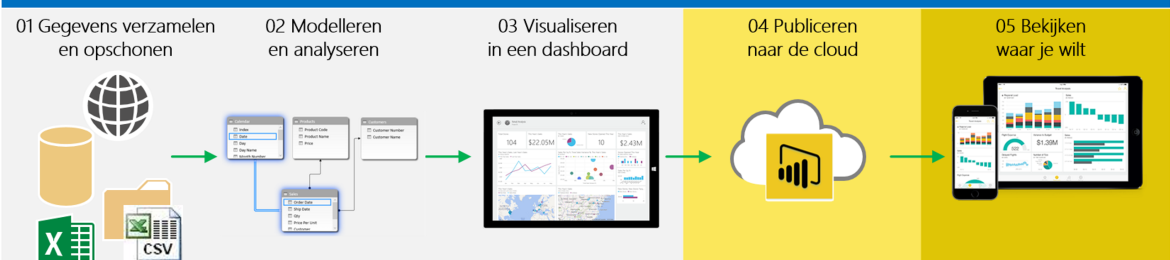
"Today we store more data than ever. Everything we do is recorded in databases. The question is how to convert all this data into useful insights?

It is my passion to help you with this! I teach you how to use (Power) BI so you can collect the right data and transform it into an attractive dashboard with the insights that you are looking for.”

Current position (1)

Power BI Trainer / Consultant

Self Employed

Presentations

Presentations (2)
Error handling like a pro in Power Query

How do you prevent unexpected data or incorrect files from blocking your dataset refresh?

In this session you will learn what options you have to make your Power Query ETL more robust, such as:
○ catch errors with try otherwise and error details
○ filtering out and logging invalid files
○ filtering and logging incorrect rows
○ Creating error reports

Introduction to Power Query Language M

M is the formula language behind Power Query. Every transformation you apply to your data is translated into M code. 

Knowledge of this language opens doors that remain closed when you only use the graphical interface.

In this session you will learn what else is possible by using the Advanced Editor, such as:
- Working with variables and data types
- Custom Columns and Time Intelligence Filtering
- Data grouping and sorting
- Creating table and scalar functions
- Crossjoin between 2 tables (make all possible combinations)

Recently, the Advanced Editor also has Intellisense, so now is the time to delve into M!

  • All (1)
  • Videos
  • Photos
  • Slides (1)
This speaker hasn't uploaded any videos yet.
This speaker hasn't uploaded any photos yet.
Introduction to Power Query language M
This speaker hasn't uploaded any one sheet yet.
This speaker hasn't uploaded any press information yet.

Books & Articles (2)

Time Intelligence with custom Calendars like 4-4-5
Introduction to Power Query language “M”

Expertise (6)

IT consulting and services
Power BI DAX power query M Microsoft SQL Server

Awards & certifications (1)

MCT
Microsoft
2021
Recommendations
Why choose me? 

Trained 1000+ students, can explain difficult topics clearly in fluent English with a touch of humor

  • Speakers
  • Agencies
  • Events
  • How it works
  • Blog
  • Upgrade
  • Podcast
  • About us
  • Organizers
  • Terms of use
  • Privacy policy
  • FAQ
  • API
  • Contact
  • Corporate Speakers Bureau & CRM
  • Motivational speakers
  • Leadership speakers
  • Business speakers
  • Inspirational speakers
  • Keynote speakers
  • Corporate speakers
  • Celebrity speakers
  • Top 50 Business Speakers
  • Top 50 Leadership Speakers
  • Top 50 Motivational Speakers
  • Top 50 Technology Speakers

Get speaking tips & so much more!

Twice a month we send you speaking tips, training ideas and lots of useful updates.

© 2026 SpeakerHub
All rights reserved.

  • Facebook
  • Twitter
  • LinkedIn
  • SoundCloud